AI Meeting Notes,
Made Simple.
MoosePad records your meetings, transcribes them in real time, and writes up a summary. Starting at just $4.99/month. Just hit record and focus on the conversation.
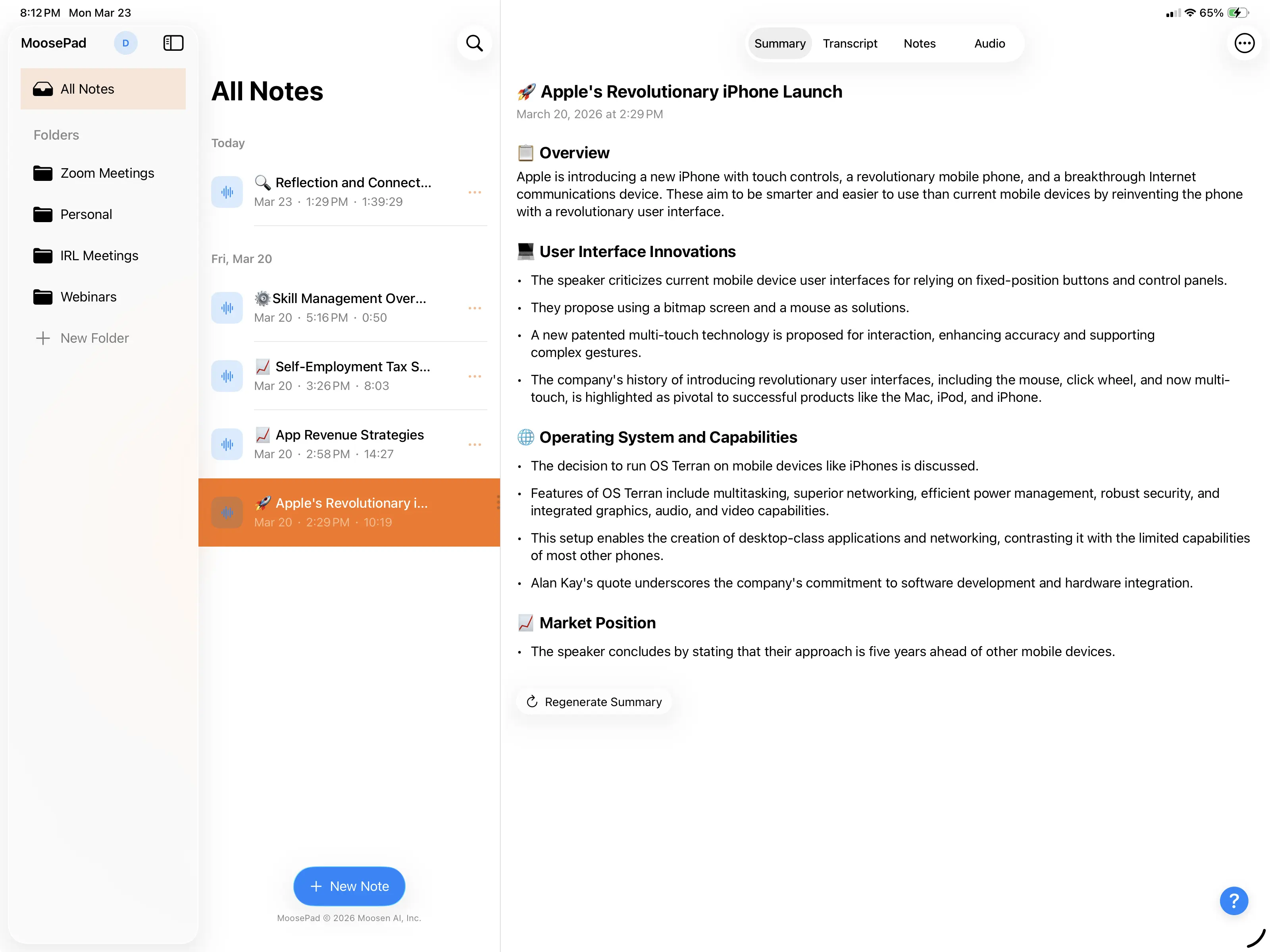
Transcribe and Summarize
Your audio stays with you.
MoosePad transcribes your meetings on-device and generates AI summaries. Your audio never leaves your iPhone, iPad, or Mac.
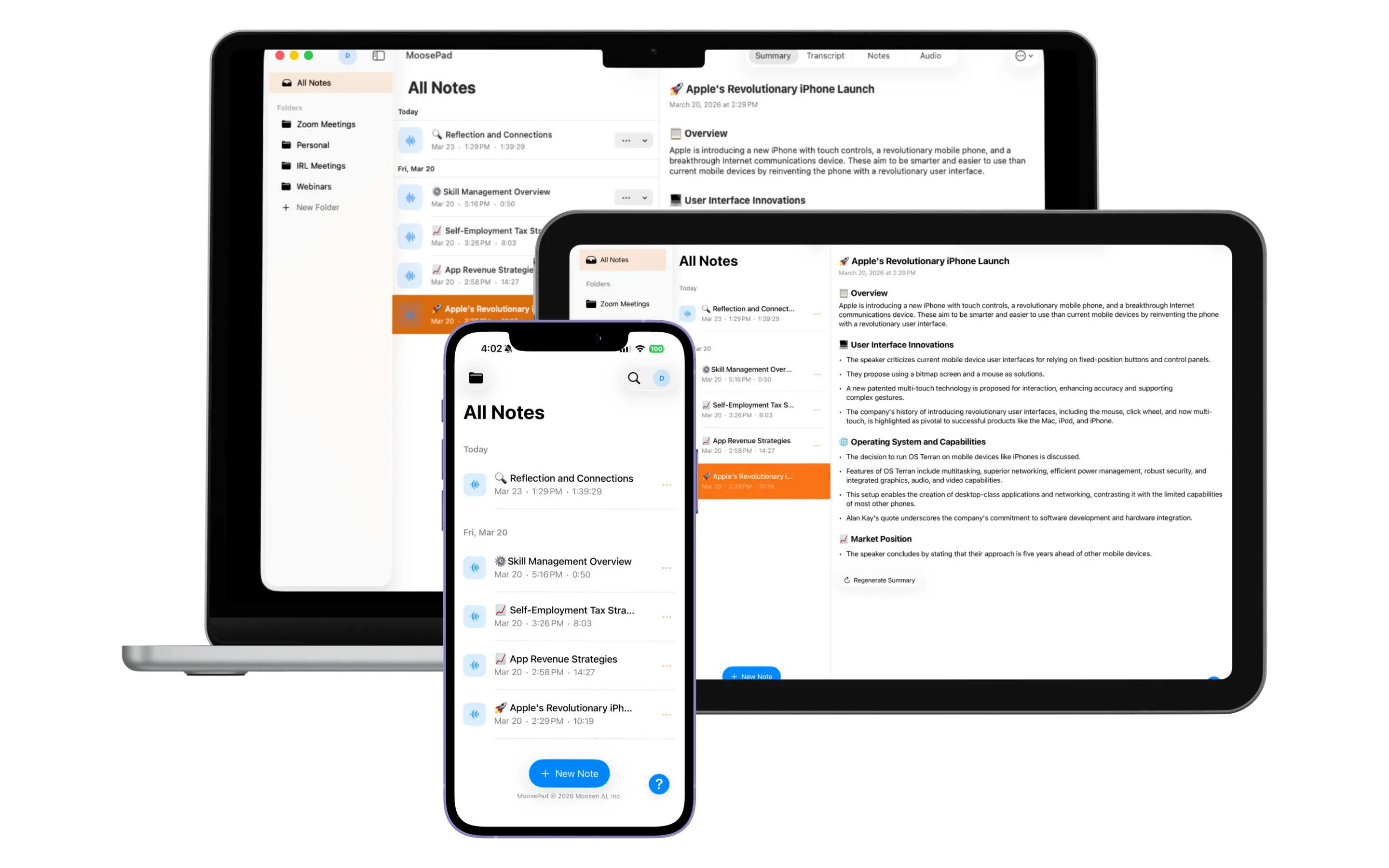
Works Everywhere
In the room
or on the call.
MoosePad records audio right from your device, so it captures the meeting whether you're sitting across the table or dialed into a call. Set it down for an in-person conversation. On a Mac it records the call's system audio directly, from Zoom, Microsoft Teams, Google Meet, WebEx, or Slack huddles. On iPhone and iPad, put the call on speakerphone and the mic captures both sides. Nobody sees a bot or "AI notetaker" joining, because there isn't one.
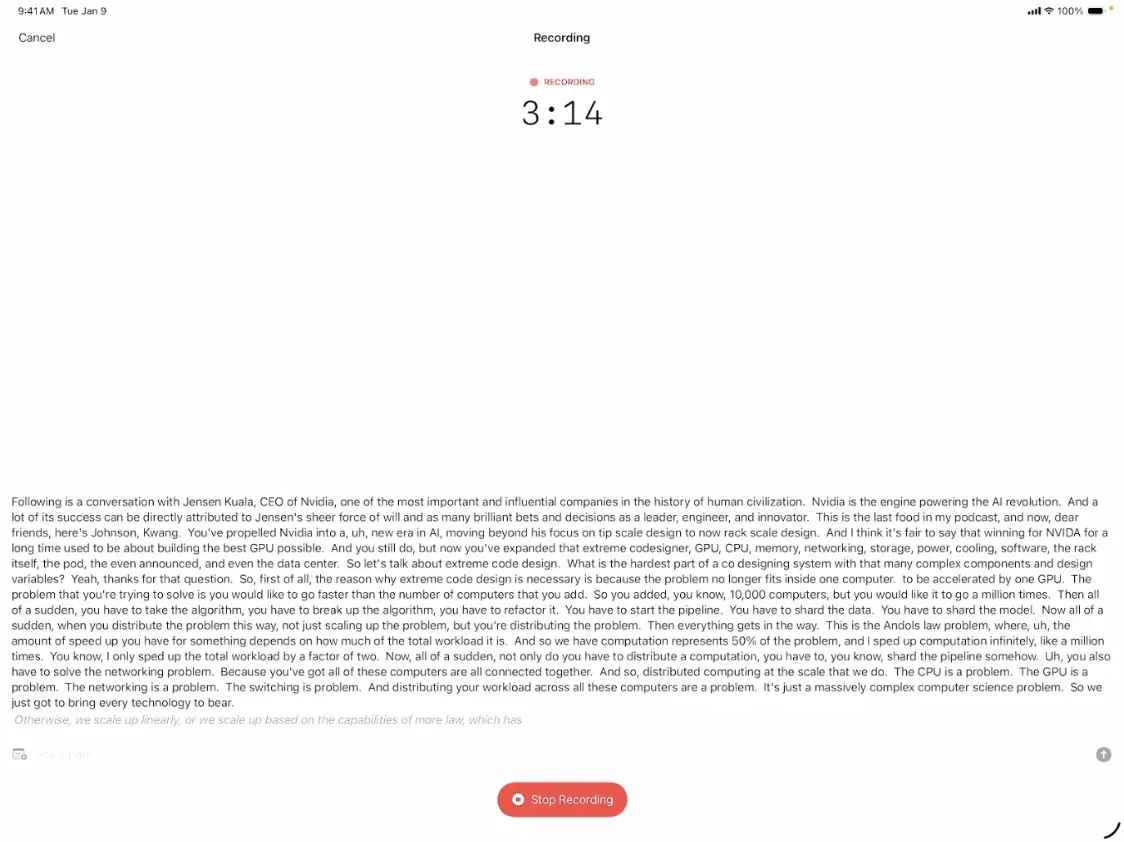
Real-Time Transcription
Every word, the moment it's spoken.
Speech-to-text happens live as you talk. You'll see the transcript build word by word, with timestamps and support for multiple languages. Language packs download on their own when you need them.
Try it free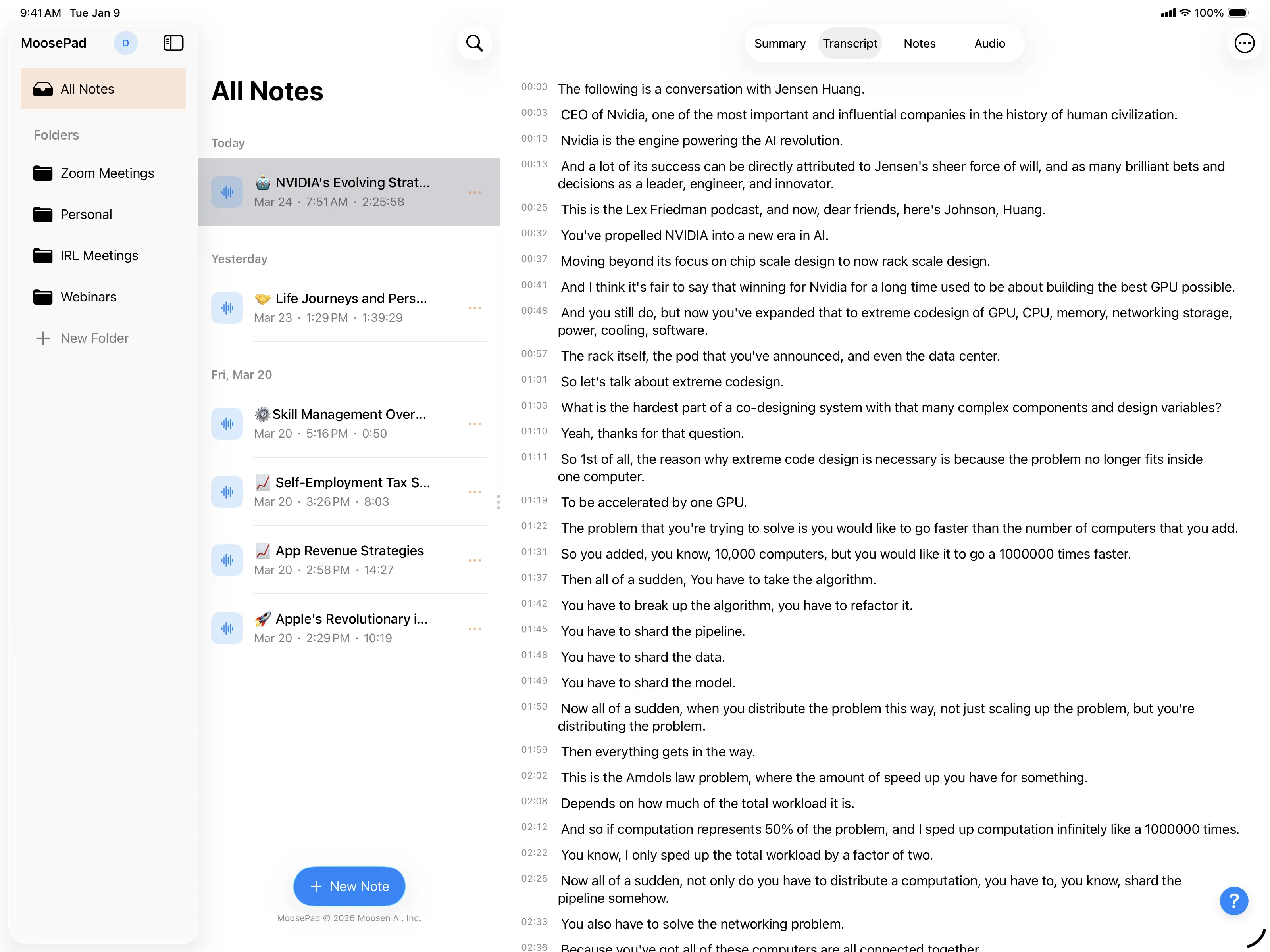
Smart Summaries
More than a summary.
After your meeting, cloud-based AI puts together a structured summary with topic sections, action items, and key takeaways. It sticks to what was actually said, so you're not getting made-up details.
Try it free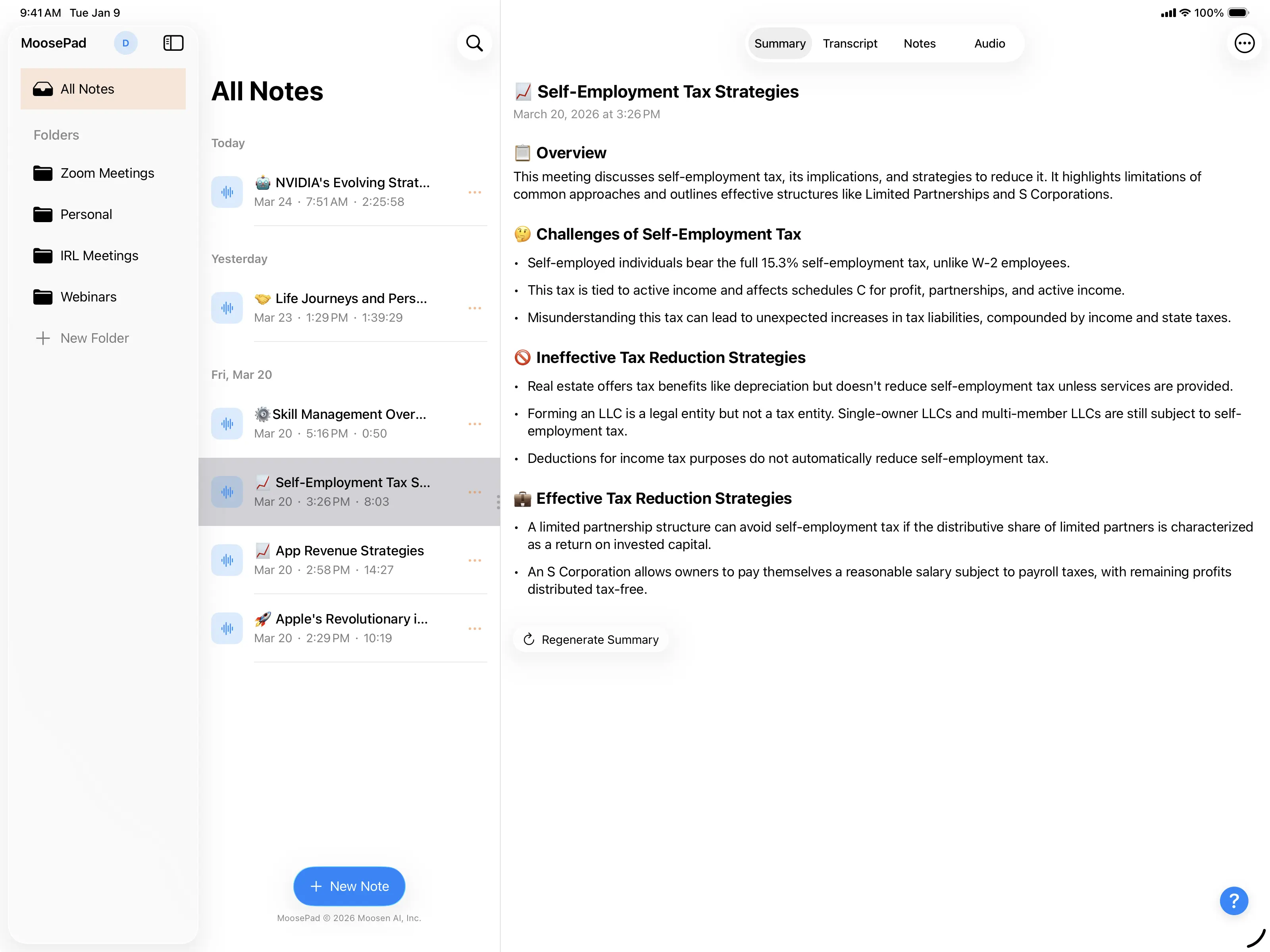
Live Activity
Your recording, right on your Lock Screen.
Check your recording time, transcription status, and the last few words of your transcript right from the Dynamic Island or Lock Screen. Tap to jump back into the app.
Try it free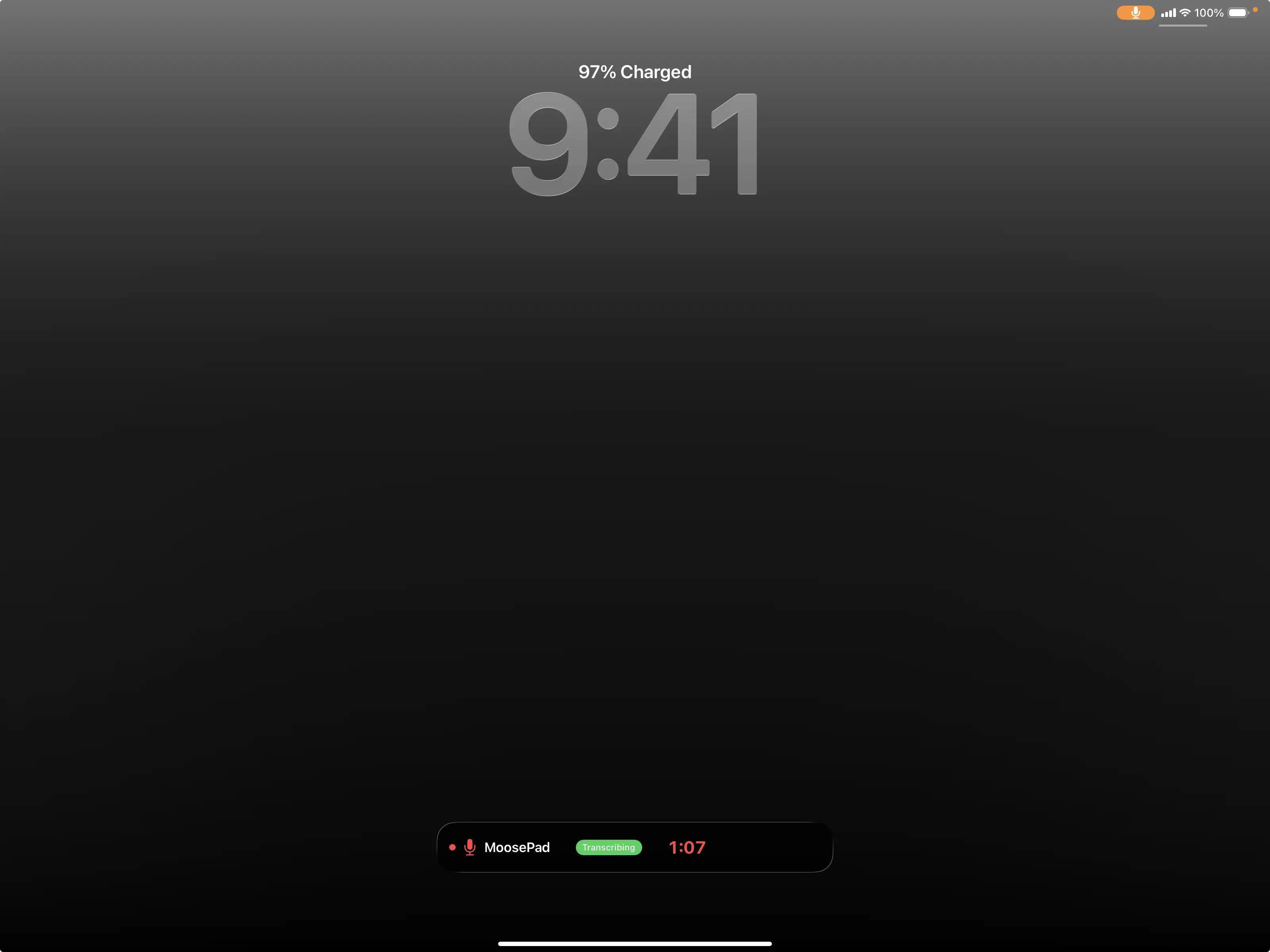
More features.
All the tools you need for recording, organizing, and sharing.
Notes During Recording
Jot down notes while you record. They get timestamped and included in your summary, so the AI has your perspective too.
Audio Playback
Built-in player with play/pause, 15-second skip, and a scrubber. Go back to any part of the recording.
Import Audio Files
Already have a recording? Import any audio file and MoosePad will transcribe and summarize it.
Folder Organization
Group your meetings into folders and search across titles and transcripts to find what you need.
Share & Export
Send summaries through the share sheet, copy transcripts to your clipboard, or export audio files and notes as text.
iCloud Sync
Record on your iPhone, review on your iPad, search on your Mac. iCloud handles the sync.
8-Hour Recording
Long meetings? All-day workshops? You get up to 8 hours of continuous recording.
Family Sharing
One subscription covers everyone. Share MoosePad with up to five family members through Apple Family Sharing.
Multilingual
25+ languages supported for summaries with 15+ supported for live transcription. Live transcription runs on-device.
Privacy
Your audio never
leaves your device.
Recording and transcription happen entirely on your device. When you ask for an AI summary, only the text transcript is sent, never the audio.
Record
Your audio is captured and stays on your device. It is never uploaded.
Transcribe
Apple's Speech framework turns speech into text right on your device, even offline.
Summarize
Only the finished transcript text is sent, encrypted, to write your AI summary. Never the audio.
Works offline. Because transcription runs on device, MoosePad keeps working on a plane or anywhere without signal. Cloud notetakers upload your audio to transcribe it. MoosePad never does.
On-Device Transcription
Speech recognition runs on your device using Apple Speech Framework. Your audio stays with you.
Your Data, Your Control
Recordings and transcripts are stored on your device and in your iCloud account. We never have access to them.
Sign in with Apple
Secure authentication through Apple ID. No passwords to manage.
Encrypted Sync
Sync between devices uses Apple's CloudKit with built-in encryption.
Compatibility
Works with your
Apple devices.
MoosePad requires iOS 26, iPadOS 26, or macOS 26. Here’s everything that’s compatible.
iPhone
iOS 26 or later
- iPhone 17 Pro Max
- iPhone 17 Pro
- iPhone 17 Air
- iPhone 17
- iPhone 16 Pro Max
- iPhone 16 Pro
- iPhone 16 Plus
- iPhone 16
- iPhone 15 Pro Max
- iPhone 15 Pro
iPad
iPadOS 26 or later
- iPad Pro 13‑inch (M4)
- iPad Pro 11‑inch (M4)
- iPad Air 13‑inch (M3)
- iPad Air 11‑inch (M3)
- iPad Air 13‑inch (M2)
- iPad Air 11‑inch (M2)
- iPad Pro (M2)
- iPad Pro (M1)
- iPad Air (M1)
- iPad mini (A17 Pro)
Mac
macOS 26 or later
- MacBook Air 15‑inch (M4)
- MacBook Air 13‑inch (M4)
- MacBook Pro 16‑inch (M4 Pro/Max)
- MacBook Pro 14‑inch (M4/Pro/Max)
- iMac 24‑inch (M4)
- Mac mini (M4/M4 Pro)
- Mac Studio (M4 Max/Ultra)
- Mac Pro (M4 Ultra)
- All earlier Apple Silicon models (M1, M2, M3)
MoosePad needs iPhone 15 Pro or later, or an iPad or Mac with Apple Silicon (M1 or later), running iOS 26, iPadOS 26, or macOS 26.
Transcription runs on-device with Apple's Speech framework. AI summaries are generated by a cloud service and need an internet connection.
Frequently Asked Questions
Does MoosePad work without a meeting bot?
Yes. MoosePad records audio directly from your device. It never joins your call as a bot or guest participant. Nobody in the meeting sees an "AI notetaker" joining. It works with Zoom, Microsoft Teams, Google Meet, FaceTime, WebEx, Slack huddles, and in-person conversations. On a Mac it captures the call's system audio directly; on iPhone and iPad you put the call on speakerphone so the mic hears both sides.
How does MoosePad protect my privacy?
Transcription runs entirely on your device using Apple's Speech Framework, and no audio is ever uploaded. When you generate a summary, only the transcript text is sent to our cloud-based AI for processing. The audio stays on your device and in your personal iCloud account. MoosePad does not use analytics, advertising, or tracking services.
Is MoosePad available for Mac?
Yes. MoosePad runs on Mac with Apple Silicon (M1 or later) running macOS 26 or later. On Mac, MoosePad captures system audio directly from apps like Zoom and Teams using Apple's ScreenCaptureKit. On iPhone and iPad, iOS does not let apps capture another app's call audio, so you put the call on speakerphone and MoosePad records both sides through the microphone, or use the Mac app for direct capture. One subscription covers iPhone, iPad, and Mac.
What Apple devices does MoosePad support?
MoosePad supports iPhone 15 Pro or later, and iPad and Mac with Apple Silicon (M1 or later), running iOS 26, iPadOS 26, or macOS 26. Transcription runs on-device with Apple's Speech framework. AI summaries are generated by a cloud service, so they need an internet connection.
Can MoosePad transcribe in multiple languages?
Yes. MoosePad has 25+ languages supported for summaries with 15+ supported for live transcription. Live transcription runs on-device via Apple's Speech Framework; summaries are generated in your chosen language via cloud AI. Language packs download automatically when needed.
How long can I record a meeting?
MoosePad supports up to 8 hours of continuous recording per session. Transcription happens in real time as you record, so you can see your transcript building word by word during the meeting.
How is MoosePad different from Otter.ai or Fireflies?
MoosePad is built specifically for Apple devices and keeps your audio on your device. Unlike Otter.ai and Fireflies, MoosePad doesn't join your meetings as a bot, doesn't upload your audio to external servers, and uses Apple's on-device Speech Framework for transcription. Your recordings stay in your personal iCloud account, not on a third-party cloud platform. See the full comparison.
About MoosePad
I kept walking out of meetings unsure of what I'd actually agreed to. Sitting across the table from someone, you can take good notes or you can stay in the conversation, but not both. So I built MoosePad. Set your iPhone, iPad, or Mac on the table, hit record, and just be present. It transcribes right there on the device, then writes up a summary with every key point and action item once you're done, so nothing slips through. No audio gets uploaded anywhere. It's made for the conversations happening right in front of you, and it works on video calls too. On a Mac it records the call's audio directly, and on iPhone or iPad you just put the call on speakerphone.

Pricing
$4.99/month. Everything.
No per-seat, no history paywall.
One flat price, every feature, on iPhone, iPad, and Mac, shareable with up to five family members. Cheaper than per-seat cloud tools, and more private: recording and transcription happen on your device, so your audio never leaves it.
or $49.99/year. One flat price, no per-seat billing.
family members share one subscription with Family Sharing.
Transcription runs on your device. Only the text transcript is sent for the summary, never the audio.
Everything included · 7‑day free trial · no history paywall.
Ready to take
better notes?
Download MoosePad and get 7 days free. Private by design, ready to go in seconds.

